
You can connect both Telegram and Notion to HubSpot workflows. Our Telegram for HubSpot app sends workflow-triggered messages to Telegram channels, and the Notion actions in 0CodeTools create Notion pages and database items straight from HubSpot Workflows. For the current end-to-end setup - including Help Desk, Contact records, Deal and Project groups, employee alerts, and response-driven workflows - read How to Connect Telegram to HubSpot (2026 Guide). Running a stack of HubSpot Zaps? See which HubSpot Zaps to move into workflows.
While HubSpot remains the gold standard in CRM and Marketing Automation for growing companies, it is impossible to ignore the widespread adoption of Telegram and Notion within the tech community. Startups and tech companies are increasingly turning to Telegram as an alternative to Slack for their internal communication needs. Meanwhile, when it comes to knowledge management and project management tools, Notion has found itself at the forefront, becoming widely popular.
Integration Excellence with HubSpot Workflows
We’ve developed integrations that are fully managed via HubSpot Workflows. It is flexible and fully transparent - you can set any triggers and automation scenarios you need.
- Telegram Channel Messaging from HubSpot: set HubSpot Workflows to dispatch real-time messages directly to Telegram channels. Whether it's for new form submissions, deal updates, or ticket alerts - the potential is expansive. Custom objects? They're fully on board too. Learn how to integrate Telegram notifications with HubSpot.
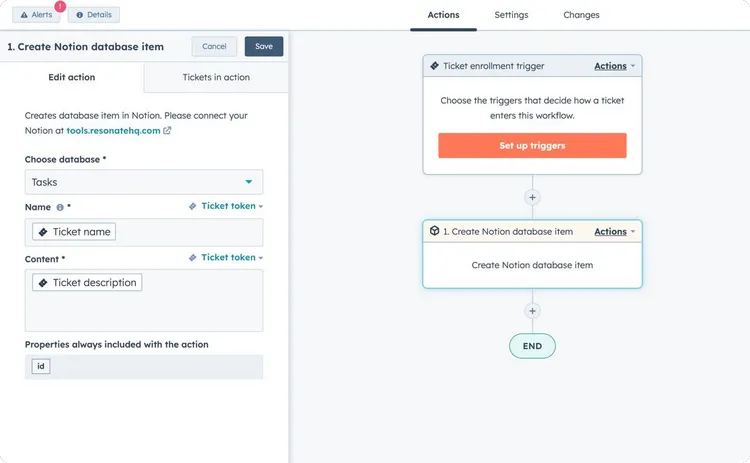
- Notion Page & Database Items Creation via HubSpot Workflows: Create Notion Pages, Tasks, Projects, Notes or any other Database Items automatically from HubSpot Workflows. The URL of every created Notion page or database item can be saved as a HubSpot custom property. Establish a property titled "Notion URL" and use the “Copy Property Value” action. This allows you to mirror the output of "Create Notion Page" or "Create Notion Database Item" directly to this property. The outcome? Direct access to the Notion entity from your HubSpot record with just one click. Works with Custom Objects.
Note: While the Links Extension handles the linking for you, keep in mind that HubSpot currently doesn't support CRM cards for Custom Objects.
Exploring HubSpot Workflow Automation Use Cases
Create Notion Project when HubSpot Deal is Closed:
-
Type: Deal based HubSpot Workflow
-
Trigger: Deal Stage = Closed Won
-
Action: Create Notion database item
Create Notion Page for New Deal in HubSpot:
-
Type: Deal-based HubSpot Workflow
-
Trigger: Deal Stage = New
-
Action: Create Notion page
Create Notion Database Item for HubSpot Form Submission:
-
Type: Contact-based HubSpot Workflow
-
Trigger: Form Submission
-
Action: Create Notion Database item
Send Telegram Notification when HubSpot Deal is closed:
-
Type: Deal-based HubSpot Workflow
-
Trigger: Deal Stage = Closed Won
-
Action: Send Telegram Notification
Send Telegram Notification when New Website Live Chat Conversation has started:
-
Type: Conversation based HubSpot Workflow
-
Trigger: New Conversation
-
Action: Send Telegram Notification
Integrating Telegram and Notion with HubSpot simplifies processes and bridges the tool gap, setting your startup for smooth operations.
Ready to try it? Install Telegram for HubSpot for channel notifications and a shared Telegram inbox, or grab the Notion actions in 0CodeTools - both work inside your existing HubSpot Workflows.