
Automate HubSpot Payments in your workflows
HubSpot workflows can't create Payment records natively. 0CodeTools adds a Create Payment action plus a CSV import tool so Commerce Hub stays in sync with every deal, invoice, and external billing system.
Create Payment records automatically in HubSpot workflows
HubSpot's native "Create record" action supports contacts, companies, deals, tickets, and custom objects - but not Payments. The Create Payment action from 0CodeTools fills this gap. Use it in any workflow to log payments with amount, currency, status, method, and customer email.
- Deal closed-wonWhen a deal moves to Closed Won, create a Succeeded payment record with the deal amount and associated contact.
- Invoice marked paidWhen an invoice status changes to Paid, log a matching payment record for full revenue reporting.
- External webhookReceive payment data from Stripe, QuickBooks, or your billing API and drop records into HubSpot.
- Subscription renewalGenerate periodic payment records for recurring revenue tracked outside HubSpot Payments.
Create a Succeeded payment of Amount (Enrolled deal) USD
Click the action to see the full configuration.
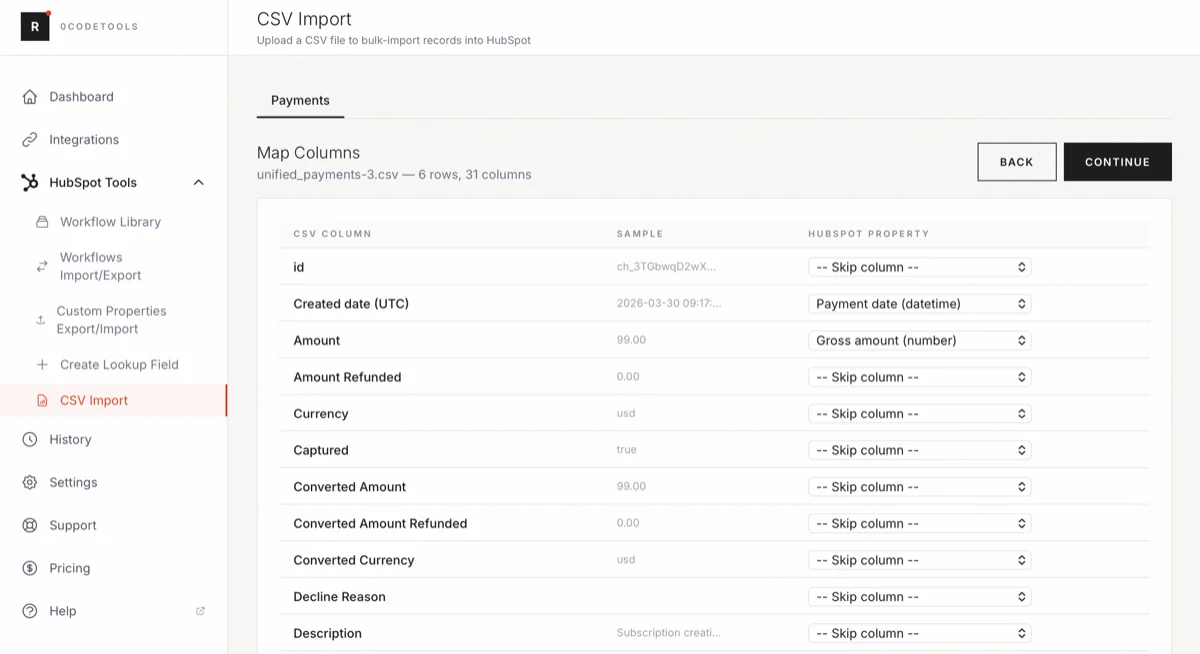
Import HubSpot Payments from a CSV file
For historical data - payments from a legacy CRM, accounting software, or external billing system - creating records one by one doesn't scale. The 0CodeTools CSV Import tool lets you upload a CSV, map columns to HubSpot payment properties, and import every record in one pass.
- Migrate from another CRMBring over historical payment records so HubSpot reporting reflects your full revenue history.
- Backfill Stripe or QuickBooks dataImport years of prior transactions from Stripe, QuickBooks, or spreadsheets in a single pass.
- Bulk reconciliationSync a batch of payments from an external accounting or ERP system on a schedule or one-off.
- One-time data cleanupImport corrected or enriched payment data after an audit without manual record creation.
Beyond payments
0CodeTools extends Commerce Hub across quotes, invoices, line items, and associations - every action works inside the HubSpot workflow editor with no code. The full feature set is covered in the Commerce Hub release notes. Want payments wired into your revenue reporting end to end? Our RevOps team builds it for you.
Create Payment
Create a Commerce Payment record with amount, currency, status, and method - from any workflow.
Create Quote
Generate a HubSpot quote from a deal with line items, expiry, and signer details pre-filled.
Add Line Items
Attach products or line items to deals, quotes, or invoices automatically as records progress.
Add Taxes
Apply tax rates to invoices and quotes programmatically, based on region or customer attributes.
Activate Payment Options
Enable Stripe or HubSpot Payments on invoices without manual portal clicks per record.
Associate Commerce Records
Link payments, invoices, and quotes to contacts, deals, and companies with Find & Associate.
Get started in 3 steps
Install 0CodeTools
Connect your HubSpot portal at toolbox.resonatehq.com. The Commerce Hub actions appear in your workflow editor instantly.
Build or import
Add the Create Payment action to any deal, invoice, or contact workflow - or go to CSV Import for bulk records.
Track revenue end-to-end
Payments flow into HubSpot reporting and associate to deals, contacts, and companies automatically.
Start tracking payments end-to-end
Start free with no credit card required. Or talk to us about enterprise Commerce Hub automation and migrations.
- Free plan available
- Create Payment workflow action
- Bulk CSV import for historical data
Start free trial