

The best HubSpot themes we compared are Realize, CLEAN Pro, Power Pro, Elements, and Generator. We ran all five through Google PageSpeed Insights: Power Pro posted the strongest speed scores, while Realize is the lowest-priced ($99 at the time of testing) and the only one that includes migration to a customized theme. The full comparison table, scores, and screenshots are below.
Building or redesigning a website can be complex. The technical aspects, branding alignment, user experience optimization, and the overwhelming choice of themes are common obstacles. A good HubSpot theme removes most of that work - but before diving into the sea of HubSpot CMS themes, it's essential to understand the difference between a theme and a template in the HubSpot ecosystem.
What is the difference between a theme and a template in Hubspot?
The main difference between a theme and a template in HubSpot lies in their purpose and design capabilities.
What is a website template?
A template is the basic building block of a website. A template is a pre-built, customizable HTML and CSS file that can be used to create web pages on a website. Templates are suitable for creating all types of web pages, from simple landing pages to fully-featured e-commerce websites. However, templates rely more on developers from the start. Editing and customization of templates can be a challenge when you have limited technical knowledge.
What is a website theme?
In contrast, a theme is a collection of design elements and settings that control the look and feel of a website. It is a set of colors and fonts, background images, layout structures, and other design elements that maintain consistency throughout a website's design. HubSpot themes are designed to streamline and simplify web design. They offer a complete set of design elements and settings so that users can create a professional-looking, consistent website without having to manually code it. A HubSpot theme consists of 3 core elements:
- Coded templates;
- Modules;
- Theme settings. Themes from HubSpot are built for marketers and content creators rather than developers using best practices in web design and include a variety of customizable elements such as logos, colors, fonts, and layout structures. HubSpot CMS requires no in-depth coding experience or expertise. HubSpot website themes are based on a drag-and-drop page builder, allowing users to add elements such as text boxes, images, and calls-to-action with a single click. To sum up, templates are less customizable and accessible as compared to themes. HubSpot CMS themes are a shift to a more advanced, user-friendly web design approach that is highly adaptable to various industries and requirements.
4 important things to take into account before selecting a HubSpot CMS Theme
First of all, you need to define the purpose of your website: What is the company trying to accomplish by establishing a website? Generate leads? Attract more customers? Get more sales? Secondly, you should determine the type of your business. Different types of businesses require different types of themes or templates. For instance, a business selling products would need a theme that showcases its products prominently and makes it easy for customers to quickly search, browse, and purchase. On the other hand, an online consulting firm would need a theme that emphasizes the services they provide, rather than selling products. Thirdly, a business should consider its target audience. Different themes and templates can appeal to different types of people, so businesses should consider their customer base when selecting a theme or template. For instance, a business targeting millennials may need to choose a modern, hip theme that appeals to their demographic. Finally, businesses should consider the technical capabilities of their websites. It is important to make sure that the theme or template they choose can be implemented easily and smoothly without any technical know-how. This includes making sure that the website is compatible with all modern browsers, operating systems, and mobile devices. Overall, businesses need to take into account many factors before choosing a HubSpot theme or template. It is important to consider the purpose of the website, the type of business, the target audience, and the technical capabilities of the website to make an informed decision.
Best HubSpot CMS Themes
The advantages of using HubSpot CMS themes for a website include:
-
The ability to quickly create, customize, and launch a website;
-
Flexible, modular design system to create tailored pages;
-
Easy integration with HubSpot's marketing and sales tools;
-
Content management and customization options for SEO, social media, and more;
-
A/B testing, analytics tracking, and reporting tools to measure effectiveness.
If you are deciding to opt for HubSpot CMS, actively looking to change your current HubSpot theme, or want to look for fresh options, here are 5 HubSpot themes that you might want to consider:
| Functionality | Realize by Resonate | CLEAN Pro | Power Pro | Elements | Generator |
|---|---|---|---|---|---|
| PageSpeed score (desktop)* | 80 | 28 | 97 | 88 | 69 |
| PageSpeed score (mobile)* | 64 | 19 | 89 | 72 | 46 |
| No coding skills required | ✅ | ✅ | ✅ | ✅ | ✅ |
| Customization | ✅ | ✅ | ✅ | ✅ | ✅ |
| Mobile image optimization | ✅ | ✅ | ✅ | ✅ | ✅ |
| Migration to a customized theme | ✅ | ❌ | ❌ | ❌ | ❌ |
| Created | Oct 29, 2021 | May 29, 2020 | Nov 21, 2020 | May 17, 2021 | March 9, 2022 |
| Recent update* | Dec 11, 2023 (v.28) | Nov 27, 2023 (v.78) | Dec 21, 2023 (v.35) | May 24, 2023 (v.16) | Dec 28, 2023 (v.14) |
| Price* | $99 | $997 | $997 | $999 | $845 |
* At the time of publication. PageSpeed scores are the Performance scores from our tests on January 9th, 2024 - full screenshots below.
Performance testing
First of all, we decided to apply performance testing to effectively measure most popular HubSpot themes across desktop and mobile devices. Page speed is important because it affects the user experience. Poor page speed can lead to a drop in page views, longer loading times, and lower conversion rates. Each theme got its PageSpeed score according to several parameters (tests were done on January, 9th 2024):
-
Performance
-
Accessibility
-
Best practises
-
SEO
Learn more about web performance using PageSpeed Insights.
The results below show how each theme performs in various scenarios.
Realize Theme: 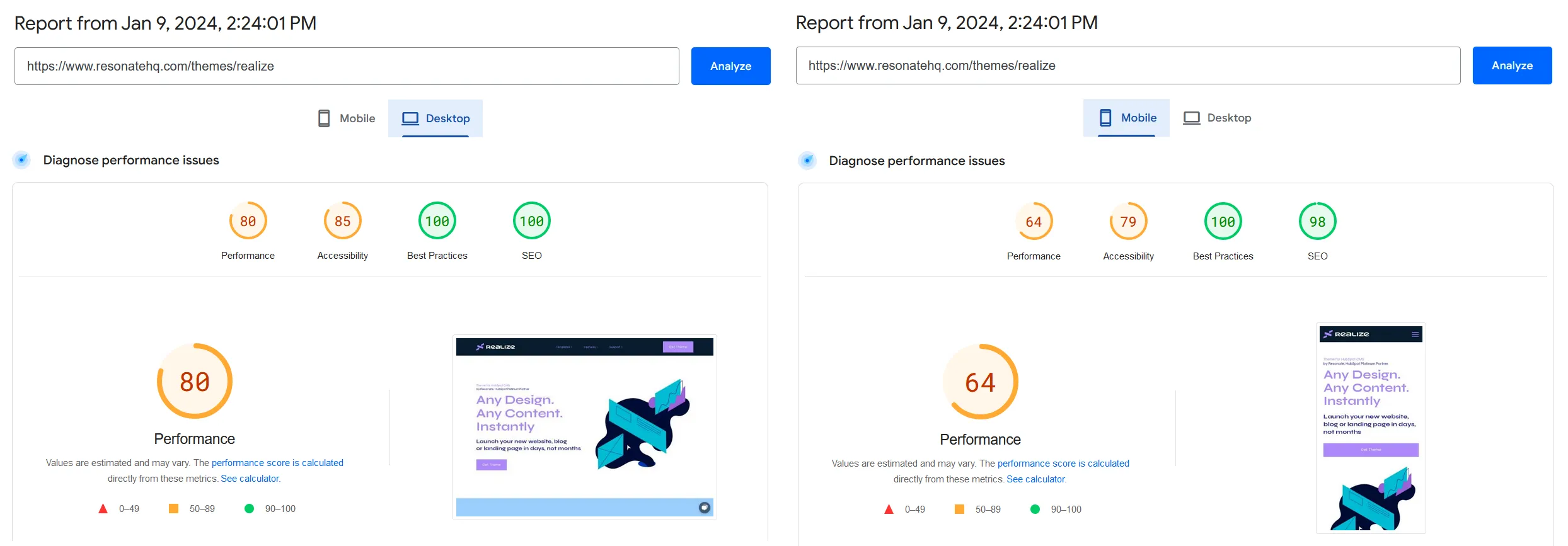 CLEAN Pro:
 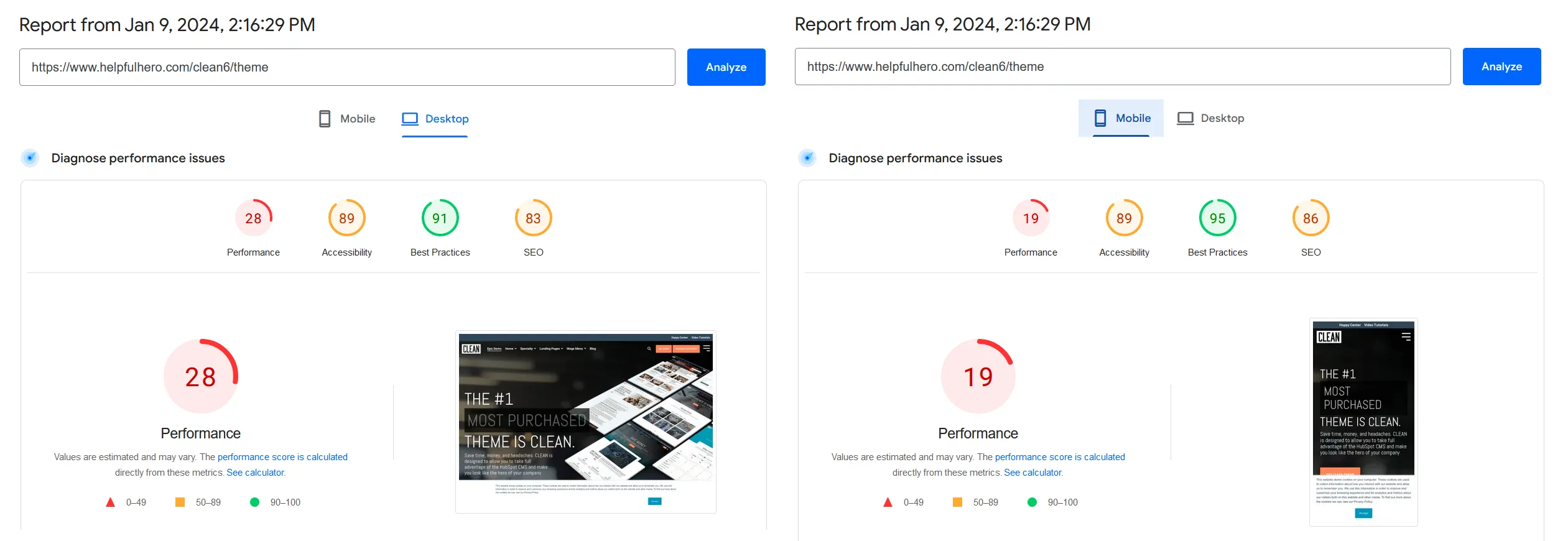 Power Pro:
 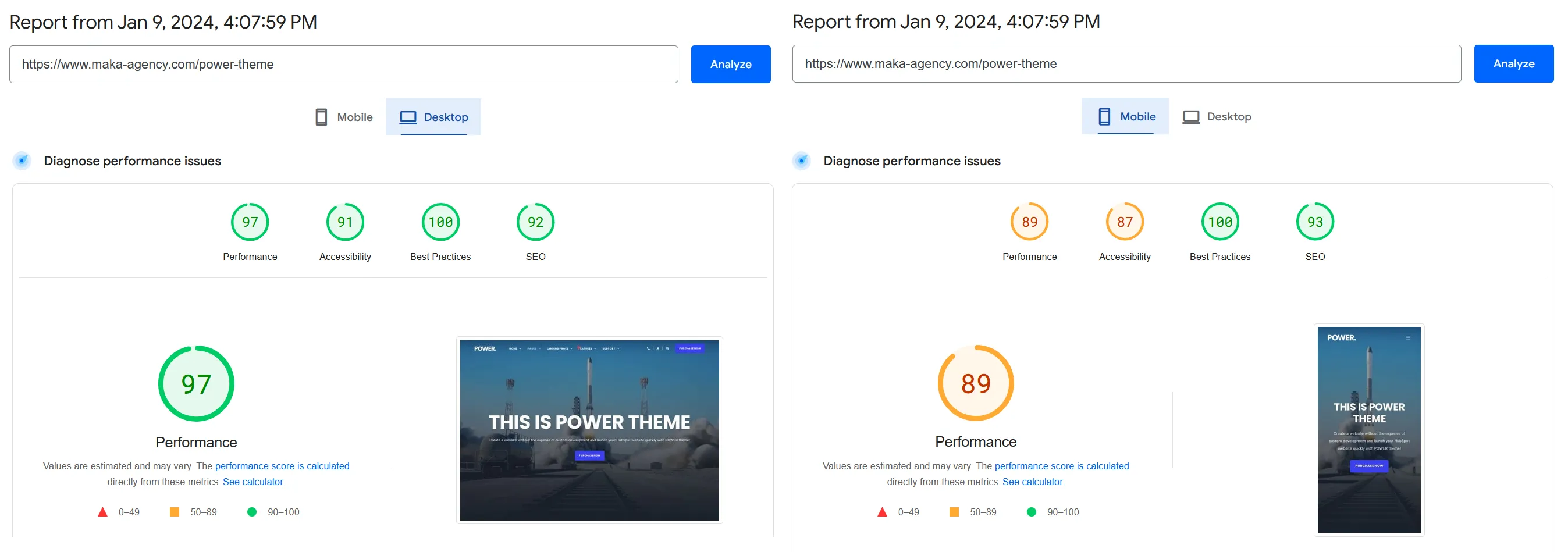 Elements:
 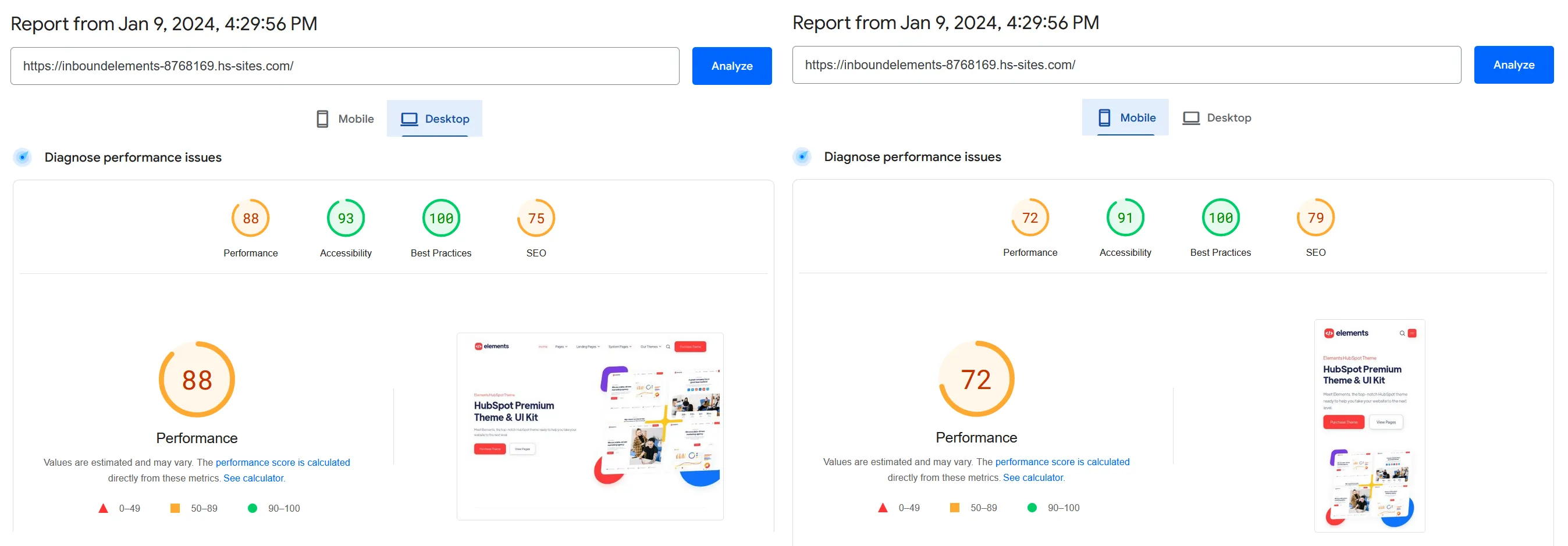 Generator: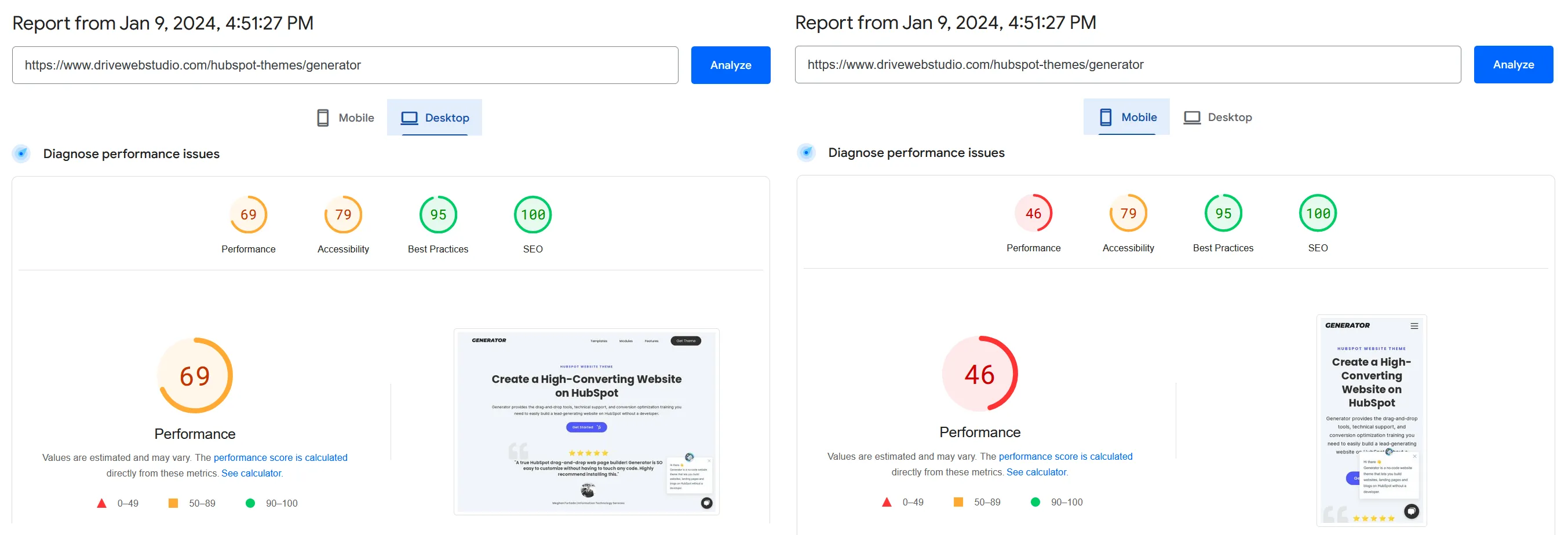
HubSpot Realize Theme
This HubSpot CMS theme combines the utmost flexibility and good value to meet your business and SEO challenges. It strikes a good balance between features, design, and customization. Here are some of the best options in Realize that you definitely should try out:
-
Flexible and consistent editor mode
-
Highly customizable templates and modules, unlimited design variations
-
Mobile image optimization. Retina support
-
No duplicated modules: easy to find what you need
-
Unlimited page layouts
-
Deep integration with HubSpot: from HubSpot Video, Drag’n’drop.
-
Compatible with any edition of CMS Hub (Starter, Pro, Enterprise) or Marketing Hub (Pro/Enterprise)
-
Unlimited email support and FREE pre-purchase consultation
Launch your new website, blog, landing page, or microsite in days, not weeks! Do you need extra functionality? Ask for HubDB, Custom objects, or 100% custom design (a subject of extra custom development costs). You will get a flexible framework tailored to meet your brand guidelines:
-
HubSpot theme adapted for your website;
-
Ability to edit, update, and expand your website over time;
-
Monthly updates to predict the future needs into the website build.
Want Realize set up on your portal? See our HubSpot website services - theme setup, migration, and design included.
HubSpot CLEAN Theme
The HubSpot CLEAN theme comes in two versions: CLEAN Pro, tailored for more complex websites, and CLEAN Lite, a faster, more streamlined way to start a website and customize it to your needs. The main difference between the two is the number of features and customization options available.
Key benefits of the CLEAN design:
- Theme flexibility: highly customizable, with many pre-designed layouts you can adapt in the drag-and-drop editor.
- Mobile friendly: fully responsive across devices and screen sizes.
- SEO friendly: clean, valid HTML markup that is easy for search engines to crawl and index.
- Easy to start: a reasonable entry point for users without coding or design experience.
The disadvantages to weigh:
- Limited features: the more advanced capabilities are only available in the CLEAN Pro version.
- Not as scalable: if your website needs more features or customization, a more advanced theme may serve you better.
- Time-consuming to master: making the most of its options takes real time and resources.
The biggest finding from our testing: CLEAN Pro posted the lowest PageSpeed scores of the five themes (28 desktop / 19 mobile).
HubSpot Power Theme
The HubSpot Power theme also offers two options: Power Pro and Power Starter. Power Pro adds a page builder, form builder, pre-made templates, custom code, and third-party integrations; Starter covers the basics for teams just getting started.
Advantages of the Power theme:
- Flexibility: highly customizable without being locked into pre-made templates.
- Easy to use: no coding skills required for a professional-looking site.
- Fast: Power Pro posted the best PageSpeed scores in our testing (97 desktop / 89 mobile).
- Comprehensive page building options for a wide range of layouts.
Disadvantages to be aware of:
- Fewer features than some competing themes, which could limit site functionality.
- Complex customization options that can be time-consuming to learn.
- Image responsiveness issues: in our review, images did not always wrap to the screen width at different zoom levels, so content blocks can get mixed up on mobile.
HubSpot Elements Theme
The HubSpot Elements theme, designed by Inbound Elements, provides an attractive, modern design that is easy to customize and maintain - a nice match for a marketing agency, SaaS startup, or something similar.
The key advantages of the Elements theme:
- Highly customizable: everything from text color to font styles within the templates.
- Mobile optimization: a fully responsive design tailored to devices of all sizes.
- SEO-friendly, with solid PageSpeed results in our tests (88 desktop / 72 mobile).
The cons of Elements:
- No website migration services provided.
- Some users report a slight learning curve.
- Setup can take long hours; a free 2-hour customization service is included, but customers with more extensive needs will require more.
HubSpot Generator Theme
The Generator theme is marketed as one of the fastest and most flexible HubSpot themes, optimized for SEO, page speed, and accessibility. It includes 23 pre-built templates and unlimited email support.
We found the following disadvantages of the Generator theme:
- It is relatively new, and some users report small bugs.
- It is missing a few modules that you will want to add.
- Its PageSpeed scores (69 desktop / 46 mobile) trailed Power Pro, Elements, and Realize in our tests.
Generator is a promising drag-and-drop theme for marketers building a HubSpot website without a developer, but it needs polish before it can compete with the major players in the market.
Conclusion
Your theme is your source of truth when it comes to the website's overall design:
- Your theme contains a set of templates, all with the same branding.
- Templates are the blueprints for pages.
- Pages are the finished product that you fill with your content and publish.
Themes let marketers make larger-scale changes to their web content without a developer or CSS knowledge. In our testing, Power Pro wins on raw speed, Realize wins on price and flexibility (and is the only theme of the five that includes migration to a customized theme), and CLEAN Pro's low PageSpeed scores make it hard to recommend despite its popularity.
Choosing or customizing a HubSpot theme? Talk to our HubSpot website team - theme setup, migration, and design included. Or get a free HubSpot audit - written findings, reply within one business day.
Related reading
- How to publish your HubSpot website to a custom domain - the launch checklist once your theme is picked.
- Why we switched our own website to HubSpot - the platform decision behind the theme decision.