
A GDPR-compliant consent statement names who is collecting the data, what is collected, why, how long it is stored, and how to withdraw consent - and it must be a clear opt-in, never a pre-ticked box. Below are copy-paste GDPR consent examples for web forms, live chat, cookie banners, and double opt-in emails.
Swap in your own company name, privacy policy link, and retention periods. All sample company names (Acme, Biglytics) are fictional. This article is general guidance, not legal advice - have counsel review your final wording.
GDPR consent form examples for web forms
Every form that collects personal data needs a lawful basis. The two consents you will use most are consent to process (you may store the data to handle the request) and consent to communicate (you may send marketing). Keep them separate - bundling them into one checkbox is a common compliance mistake.
Consent to process (checkbox on a contact or demo form):
I agree to allow Acme Corp to store and process the personal data I submit in this form so that Acme can respond to my enquiry. I can request access to or deletion of my data at any time, as described in the Privacy Policy.
Consent to communicate (separate, optional marketing checkbox):
I would like to receive marketing emails from Acme Corp about products, services, and events. I can unsubscribe at any time using the link in any email. See the Privacy Policy for details.
Per-subscription checkboxes with a processing notice (gated content form):
- Yes, send me the monthly Biglytics newsletter.
- Yes, notify me about Biglytics webinars and events.
By submitting this form, you agree that Biglytics may store and process your details to deliver the content you requested. Full details, including how to withdraw consent: Privacy Policy.
Sample GDPR live chat consent statements
A live chat widget collects personal data the moment a visitor types their name or email, so the consent statement belongs in the chat greeting - before you ask for contact details.
Standard chat widget greeting:
Hi! Before we start: by continuing this chat, you agree that Acme Corp may store this conversation and any contact details you share so we can answer your question and follow up. You can request a copy or deletion of your data at any time - see our Privacy Policy.
Short version for compact widgets:
By using this chat you consent to Biglytics processing the personal data you share here to handle your request. Your rights and our contact details are in the Privacy Policy.
Chat statement with a separate marketing opt-in:
Happy to help! We store chat transcripts so we can resolve your question and improve support. If you would also like occasional product updates by email, reply YES - otherwise we will only contact you about this conversation.
GDPR cookie banner example
Cookie consent covers analytics, ad pixels, and any tracking script that is not strictly necessary to run the site. The banner must offer a real choice - "accept" and "decline" with equal prominence - and let visitors change their mind later.
Cookie banner wording:
We use cookies: necessary cookies to run this site, statistics cookies to measure traffic, and marketing cookies to personalise content and ads. Accept all, decline non-essential, or choose per category. You can change your choice at any time on our Cookie Settings page.
Here is how a category-based banner looks in practice (example from Cookiebot):
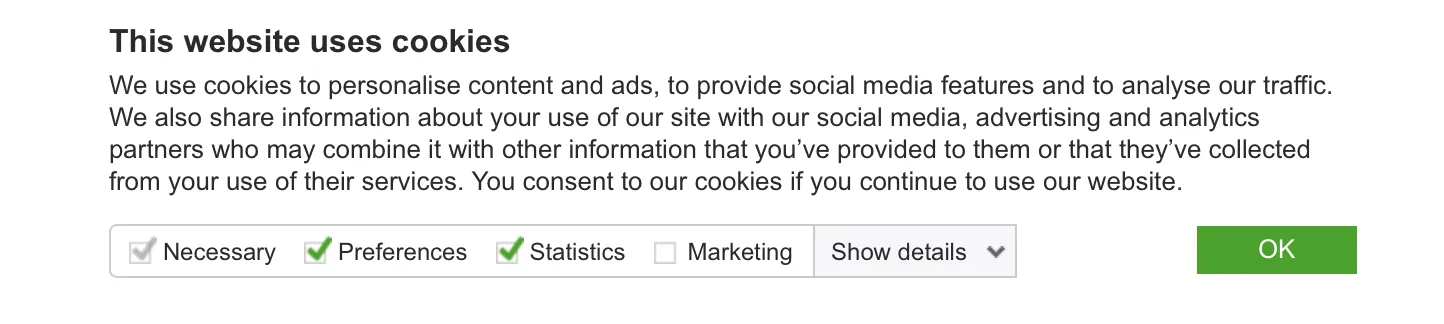
Dedicated consent-management services like Cookiebot or Civic Cookie Control handle the category logic and script blocking for you.
Double opt-in confirmation email wording
Double opt-in is the cleanest proof of consent for email marketing: the subscriber confirms from their own inbox before receiving anything. Sample confirmation email:
Subject: Please confirm your subscription
Hi there,
You (or someone using this email address) signed up for the Acme newsletter at acme.com. Click the button below to confirm - we will not send anything until you do.
Confirm my subscription
If you did not request this, ignore this email and we will not contact you again.
How to set up GDPR consent in HubSpot
HubSpot has data privacy settings built in. Once enabled in your portal, you can:
- Add a consent-to-process section to any HubSpot form, as a checkbox or a notice, using wording like the examples above
- Add consent-to-communicate checkboxes per subscription type, so newsletter and event consent are tracked separately
- Set the lawful basis for processing on forms and imports, including legitimate interest where consent is not the right basis
- Show a consent message in chatflows before collecting contact details
- Run the cookie consent banner from HubSpot's tracking settings, including blocking tracking until the visitor opts in
Each consent is stamped on the contact record, so you can prove when and how it was given.
Want this configured in your portal instead of copy-pasted? We set up GDPR-compliant consent capture in HubSpot - forms, chatflows, cookie banner, and subscription types. Book a call.
What is GDPR?
The General Data Protection Regulation (GDPR) is the European Union law governing how organisations collect, store, and process personal data of people in the EU. It applies to any business, anywhere in the world, that processes EU residents' data. If your website can even theoretically capture leads from Europe, GDPR applies to you.
On the security side, GDPR requires appropriate security measures to protect personal data from unauthorised access, alteration, disclosure, or destruction: encryption, access controls, regular audits, and staff awareness of data protection practices.
How does GDPR affect B2B sales?
B2B companies must be transparent about how they collect and use customer data, and give customers the right to access and control that data. In practice, website and business owners should:
- Publish a clear data protection policy that explains how data is collected, stored, and used. The UK ICO has a good review of what belongs in a privacy policy.
- Be transparent about data processing activities: the purpose, the type of data collected, and how long it is stored.
- Obtain explicit consent before collecting or processing personal data on your website (analytics, user action tracking, ad pixels), using consent examples like the ones above.
- Implement measures to keep personal data secure and confidential.
- Give users the ability to access, rectify, and delete their personal data, and respond to access requests free of charge in the normal case.
- Allow users to request transfer or deletion of their personal data.
- Notify users of any data breach within 72 hours of its occurrence.
- Appoint a Data Protection Officer (DPO) if the business processes large amounts of data.
- Establish procedures for handling data subject complaints and requests.
- Comply with the right to be forgotten and delete all collected data upon request.
Setting up consent capture, subscription types, and privacy workflows in HubSpot? Our HubSpot consulting team configures the whole stack, and HubSpot onboarding covers compliance setup for new portals.
Related reading
- HubSpot Chatbot Guide - where the chat consent statement fits in a chatflow build.
- Email Marketing for B2B - building an opted-in list that converts.
- Integrate Your Website with HubSpot CRM - connecting the forms that capture all this consent.